

Salesforce AI Data Sharing Opt Out: What Nonprofits, Associations, and Foundations Need to Knows

Salesforce’s Spring ’26 release includes a significant new feature for data privacy: admins can now manage the Salesforce AI data sharing opt out directly from Setup. For nonprofits, associations, and foundations that steward sensitive constituent data, this is important information and should be acted upon as soon as possible.
Beyond this specific update, AI raises broader questions for mission-driven organizations: How do we use AI tools responsibly when sensitive data is involved, both within Salesforce and otherwise?
Spring ’26: The New Self-Service Opt Out
Salesforce’s Main Services Agreement (MSA) allows Salesforce to use your Customer Data to train global predictive AI models, improve existing services, and support research into new features unless you opt out.
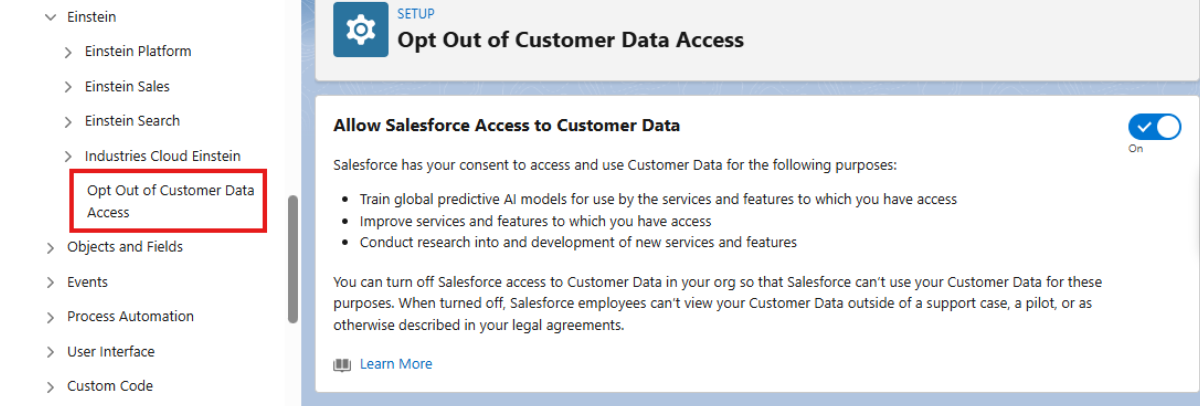
To find the opt out in Setup, type “Opt” in Quick Find and select “Opt Out of Customer Data Access.” The toggle is on by default. Here’s what each state means:
- Toggle ON (default): Salesforce may use your Customer Data to train AI models, improve services, and support R&D. (Note: for Government Cloud customers, this setting is default toggled to OFF.)
- Toggle OFF: No new data is shared. Previously collected data is deleted within 30 days. Salesforce employees cannot view your data outside a support case or conditions defined in your legal agreements.
Our recommendation: Review this setting today. Most nonprofits, associations, and foundations work with sensitive constituent data, whether it’s health histories, financial hardship details, immigration status, member records. Opting out is a simple, low-effort step that meaningfully limits your data exposure.
How Salesforce Protects Data Within the Platform: The Einstein Trust Layer
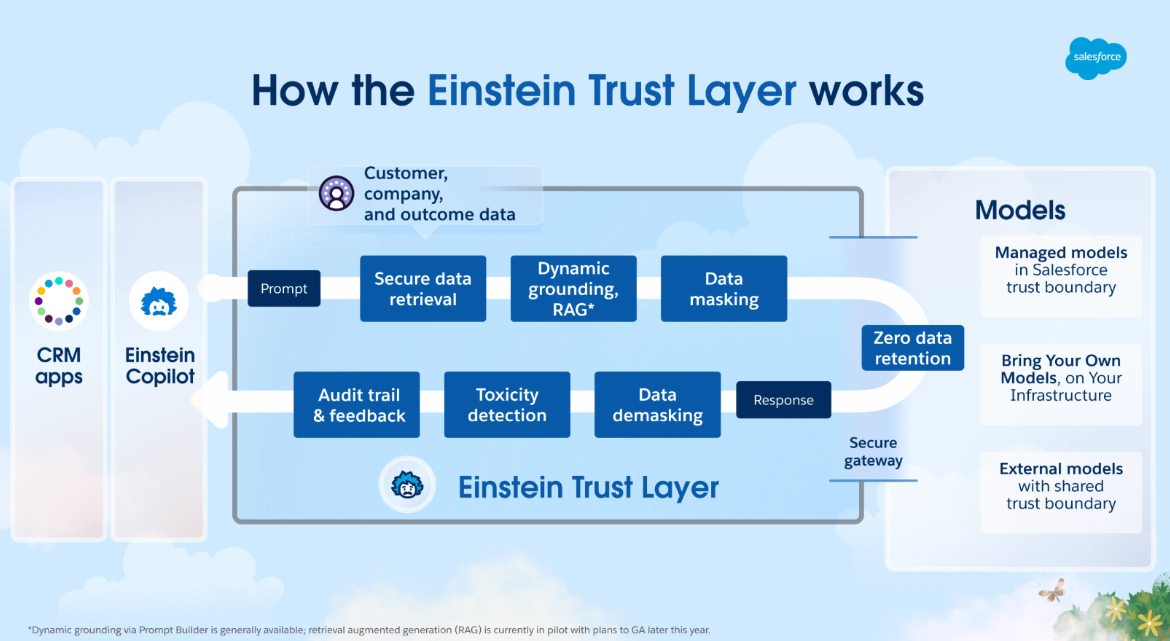
Separate from the opt out question, Salesforce has built meaningful protections for data used inside its AI features using tools like Einstein Copilot, AI-generated case summaries, and predictive scoring. These protections are part of the Trust Layer.
Think of the Trust Layer as a secure intermediary between your Salesforce data and any large language model (LLM). Key features include:
Data Masking
Before any information is sent to an outside AI system, Salesforce automatically detects and hides sensitive details like names and contact information through data masking, then restores them once the AI responds. It is worth noting that this protection is not currently active for Agentforce, so organizations using that product should keep that in mind. This means that in certain contexts, sensitive data needs to be exposed to an LLM in order to provide the needed context to fill an agent prompt or complete an agent action.
Zero Data Retention
Even though Salesforce occasionally needs to expose sensitive, non-anonymized data to outside LLM partners to allow full Agentforce functionality, Salesforce has contractual agreements with LLM partners, including OpenAI, that your data is never stored or used for model training after a response is generated. This agreement for zero data retention is separate from Salesforce’s new opt out for predictive AI training – your Agentforce conversations and actions are automatically protected by this zero data retention policy.
Dynamic Grounding & Secure Data Retrieval
AI prompts are enriched with relevant CRM context while honoring your org’s existing sharing rules. Users only surface data they already have permission to see. This dynamic grounding and secure data retrieval is a key aspect of the Einstein Trust Layer.
The Bigger Risk: External AI Tools and Sensitive Data
The Trust Layer only covers what happens inside Salesforce. When a staff member pastes constituent data into ChatGPT, Claude, Gemini, or another public AI tool, none of those protections apply.
This happens more than most organizations realize. To someone cleaning a spreadsheet, drafting a case summary, or synthesizing a grant application, these feel like productivity shortcuts, and AI is genuinely powerful at these tasks. But when sensitive data is involved, the risks are real.
- The data may be stored or used for model training
- It may be accessible to staff at the AI company
- It may fall outside your privacy agreements, grant terms, or HIPAA obligations
Free and consumer-grade AI tools should be treated with significant caution. Enterprise versions (ChatGPT Enterprise, Claude for Work, etc.) offer stronger protections, but any use involving real constituent data warrants careful evaluation.
Best Practices for AI Data Security
- Establish an AI use policy. Define clearly what data can and cannot be used with external AI tools. Keep it practical and accessible.
- Never input sensitive constituent data into public AI tools. This includes names paired with sensitive details, case notes, health or financial data, and anything your org would consider confidential.
- Anonymize first. When AI can help you analyze or process data, strip or replace identifying details before finalizing your work. Aggregated, anonymized data is almost always safe.
- Train your team. Brief, practical training on AI data risks goes a long way as these tools become embedded in everyday work.
Additional Einstein Trust Layer Resources
→ Einstein Trust Layer – Salesforce
→ Secure Generative AI with the Einstein Trust Layer – Trailhead
→ Inside the Einstein Trust Layer – Salesforce Developer Blog
Where AI Genuinely Shines With Data
None of this means avoiding AI. Far from it. Used thoughtfully, AI can dramatically accelerate data work that previously could take days. Here are some high-value, lower-risk applications that can be helpful for mission-driven organizations:
- Generating synthetic/dummy records for Salesforce sandbox testing and import validation
- Converting inconsistently formatted data, such as free-text dates, address variations, and hand-entered codes, into structured formats
- Analyzing anonymized or aggregated program data for trends and insights
- Writing formulas, SOQL queries, or transformation logic using only field names and structure (not actual records)
- Drafting data dictionaries, field mapping documents, or migration specs
- Summarizing publicly available reports, grant guidelines, or regulatory documents
A Real Example: Transforming Legacy Date Data
One of Fionta’s long-time foundation clients was migrating from a legacy system into a newly built Salesforce Agentforce Nonprofit Grantmaking environment. Their source data included a date field stored as free text (yikes!) with years of hand-typed entries in dozens of formats: “January 5th, 2019,” “1/5/19,” “05-Jan-2019,” and many ambiguous variations.
With the client’s explicit approval, we extracted just the text strings (using no other identifying information) and used AI to standardize the formats and flag entries too ambiguous to convert reliably. What would have taken days of manual work was completed in a fraction of the time.
This is the model we encourage: AI as a precision tool, operating on the minimum necessary information, with organizational awareness and sign-off at every step.
The Bottom Line
AI can be a powerful tool to support your mission, but the undisciplined use of it with sensitive data could be damaging. Start with the action that’s right in front of you:
- Admins: Review the “Opt Out of Customer Data Access” toggle in Salesforce Setup today.
- Leadership: Establish a practical AI use policy before staff habits create gaps.
- Everyone: Treat constituent data with the same care in AI tools that you would in any other system. The trust your community places in you extends to every tool you use.
Fionta is here to help. If you have questions about your organization’s Salesforce AI Data Sharing Opt Out or would like to review your organization’s Salesforce data settings, AI readiness, or data governance approach, reach out to your Fionta consultant or complete our contact form. We’ll reach out shortly. We’ll ensure