


Salesforce Summer 2026 Release Updates

The Salesforce Summer ’26 release is on its way, bringing updates across Agentforce, Flow, Experience Cloud, reporting, Commerce, and industry clouds. This release continues Salesforce’s shift toward the “Agentic Enterprise,” with more ways for people and AI agents to work together across business processes. The release notes are still in preview, so teams should validate features in a sandbox before making roadmap or purchasing decisions.
Key dates and actions
Following the usual Salesforce release-readiness cycle, users will see pre-release access, release notes preview, sandbox preview, and phased production rollouts. Because some features are enabled automatically and others require administrator setup, organizations should confirm their instance-specific dates in Salesforce Trust, test relevant functionality in the sandbox, and communicate user-facing changes before production rollout.
Salesforce’s Summer ’26 release is currently in preview, with release activity beginning in April and production rollouts scheduled across May and June. Salesforce recommends using the Trust Status Maintenance Calendar to confirm the exact timing for your specific Salesforce instance.
| Date | Milestone | What to do |
| April 16, 2026 | Pre-release orgs become available | Sign up for a pre-release Developer Edition org to explore Summer ’26 features in a clean environment. |
April 22, 2026 | Release notes preview published | Review the release notes and identify features relevant to your org, users, and roadmap. |
| May 7, 2026, before 5 p.m. PT | Sandbox refresh deadline | Refresh eligible sandboxes before the deadline if you want them on a preview instance for early testing. |
| May 8, 2026 | Sandbox Preview begins | Begin testing automations, integrations, Experience Cloud sites, permissions, custom code, and user-facing changes. |
| May 15, June 5, June 12, and June 13, 2026 | Summer ’26 production release windows | Check your instance on Salesforce Trust to confirm when your production org receives the release. |
| June 8, 2026 | Admin release readiness content begins | Review Salesforce’s admin-focused Summer ’26 feature content and use it to support internal planning and communication. |
Summer 2026 release highlights
Flows and automations
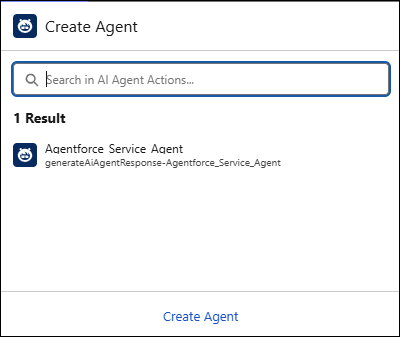
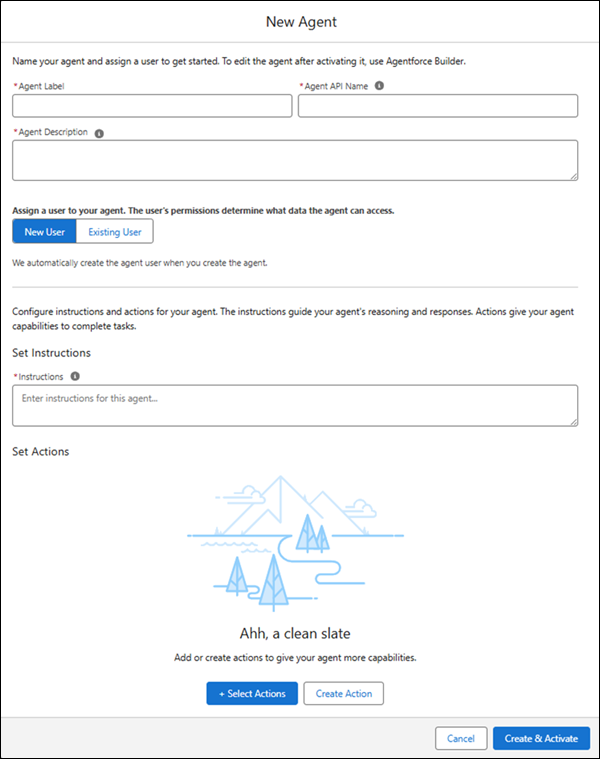
Create and use Agentforce Agents directly in Flow Builder – Admins can create and use Agentforce agents directly in Flow Builder. You can select from existing agents or create task-specific agents with custom instructions and actions, all from the Flow Builder canvas.
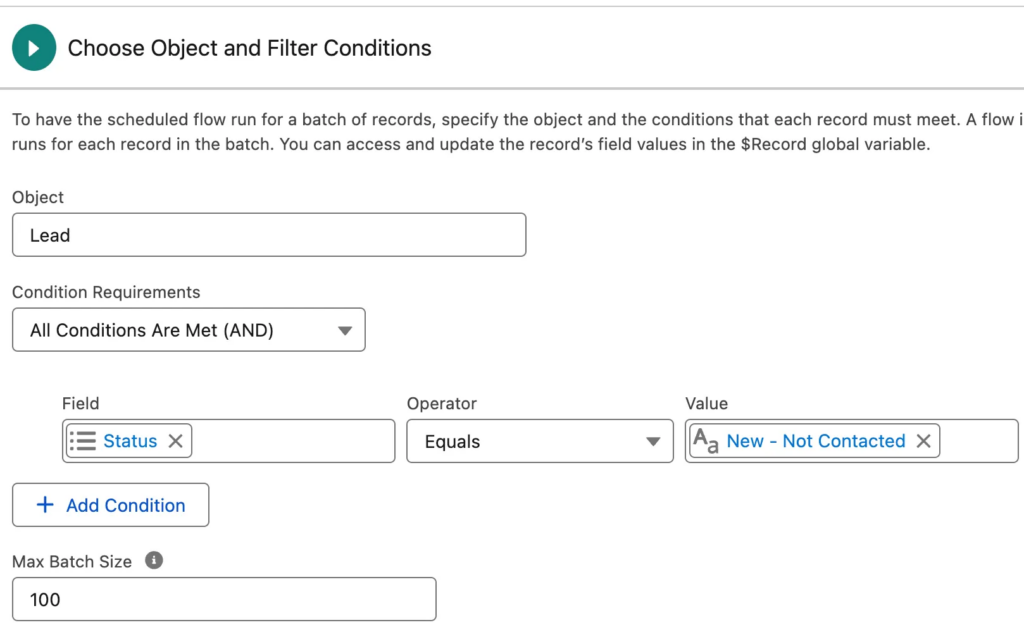
- Batching for Scheduled Flows – Previously, scheduled flows processed interviews in default batch sizes of 200. This release allows the user to partition flow interviews into smaller batches ranging from 1 to 200, directly from the flow’s start element. Reducing the batch size for scheduled flows is a great way to go around some system limitations (Salesforce or other platforms) and not rely on Apex. For example, if you want to use a flow to send data to an external system. But making API callouts with a batch size of 200 results in a timeout error from the external system, with this new feature you can now tweak your batch size so the callouts no longer fail.
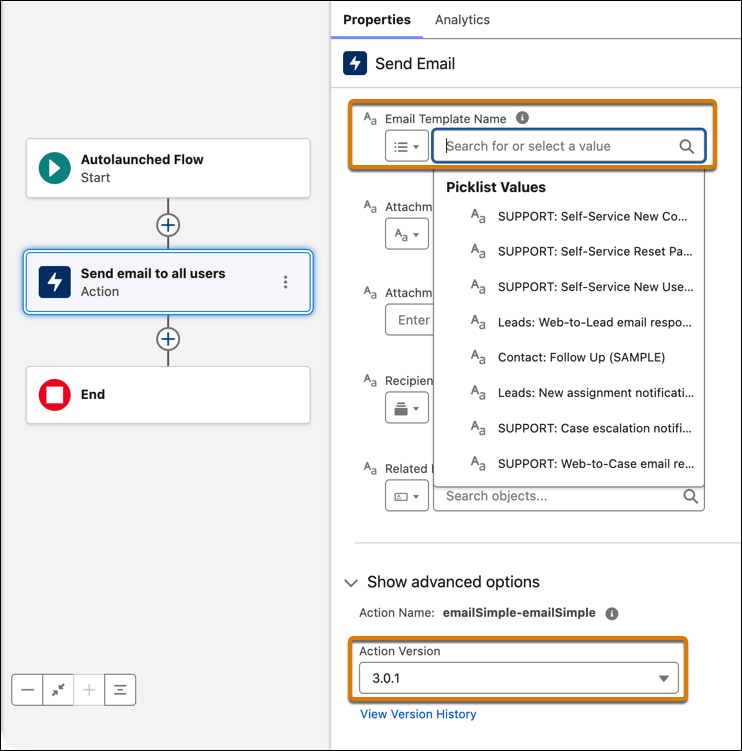
- Send Email action now allows for referencing Email Template names instead of IDs – Deploy flows with Send Email actions more reliably across environments. Email templates can now be selected by name and stored as persistent references, instead of template IDs that change between orgs and require manual fixes after deployment.
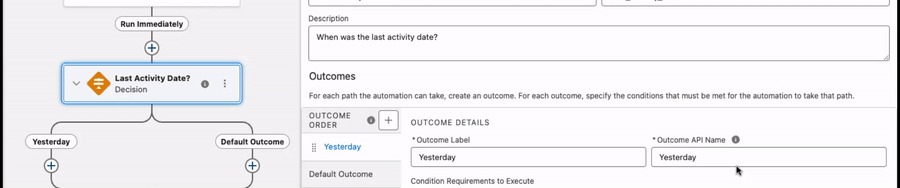
- Use Date Operators in Decision Logic – This allows for date-based branching with date operators in Decision elements. Select operators such as Is Today, Is Anniversary of Today, and Last Number of Days when a condition uses a date data type, so you no longer have to use formula workarounds.
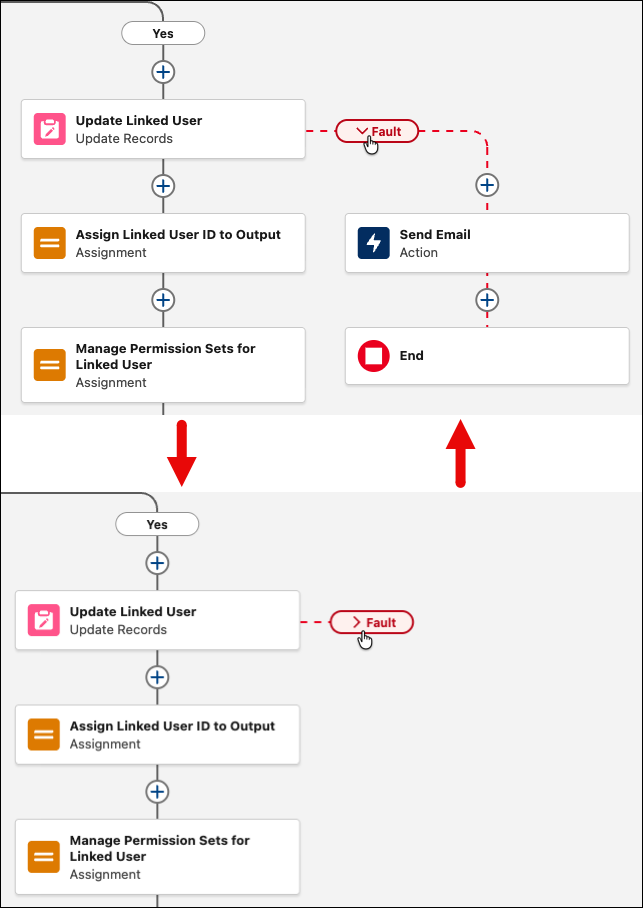
- Collapsible Fault Paths – A feature to collapse fault paths so you can focus on your main flow, with the ability to expand them only when you’re ready to edit or review them.
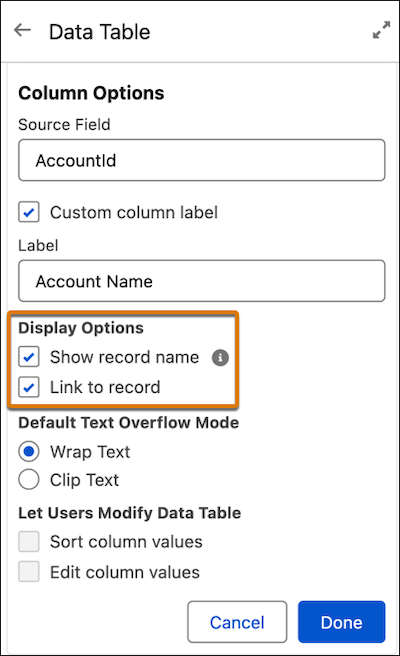
- View Related Record Names and open the Related Record from Data Table Lookup Columns – In screen flows, Data Table lookup columns can now show the related record’s name instead of its Salesforce ID. You can also make the name a hyperlink so users can open the related record in a new tab without custom workarounds.
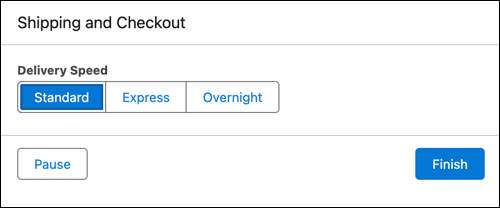
- Improved radio button layouts – Screen flows now include a Radio Button Group component that displays single-select choices in a more compact, scannable layout. Options can appear horizontally on desktop or vertically on mobile, reducing scrolling and offering a cleaner alternative to traditional radio buttons, checkboxes, or picklists.
Experience Cloud
Experience Cloud gets useful updates for organizations that rely on portals, communities, or self-service sites.
- Malware scanning for Salesforce Files is now generally available – Salesforce Files can be scanned for viruses or malware, with a new Setup page for managing scanning and notifications. Users with the right permissions can also access, download, and receive alerts about malicious files.
- More styling options for screen flows – Admins can now customize the look and feel of additional screen flow components, including Action Button, Address, Lookup, Email, Phone, Toggle, and URL fields. These style settings can override the default org or Experience Cloud site theme.
- Larger file uploads in Experience Cloud – Users can now upload files up to 10 GB to LWR sites through the File Upload component, increased from the previous 2 GB limit.
Reports and dashboards
Reporting gets practical enhancements for usability, branding, and security.
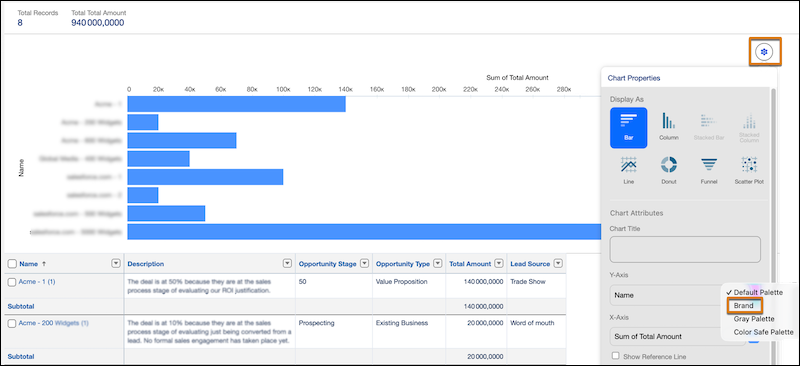
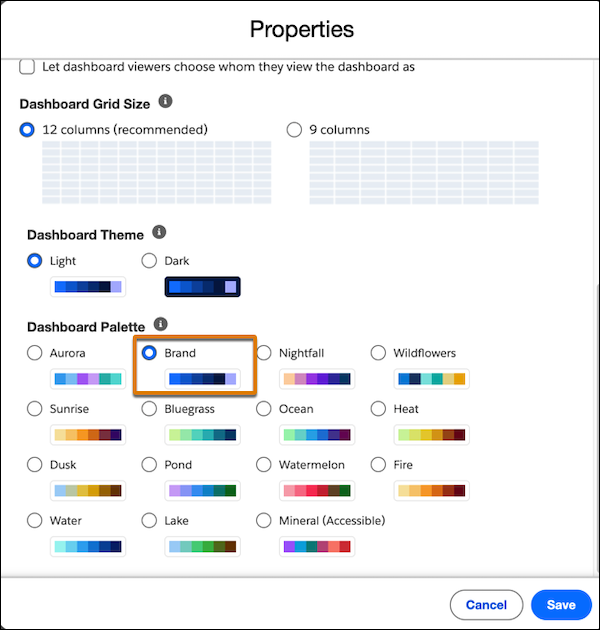
- Consistent report and dashboard branding – Teams can now configure a brand color palette once in theme settings and apply it to report and dashboard charts, reducing manual formatting and supporting more consistent, accessible visuals.
- More row-level formulas in reports – Salesforce reports can now include up to two row-level formulas, making it easier to calculate multiple values directly in a report without creating new formula fields on the object.
Fundraising
Summer ’26 also brings several practical updates for nonprofit teams, especially those using Salesforce Fundraising. A new Donor Support Agent can help donors manage recurring gift requests through an Experience Cloud site, including changes to gift amount or frequency. For advancement and development teams, this may reduce routine support work while improving the donor experience.
The release also introduces options to pause gift validations during data migrations, helping teams reduce errors when importing gift transactions, commitments, and schedules. Recurring gift processing is being improved with concurrent commitment processing, which can automate lifecycle steps like closing completed commitments or flagging missed installments.
For healthcare fundraising, Salesforce is adding Grateful Person Involvement records to help track patient gratitude and related philanthropic support. Agentforce for Nonprofits, formerly known as Nonprofit Cloud, also includes updates for feature discovery and setup, Grants Management, and the Nonprofit Connect REST API, so grants and fundraising teams should review the details before enabling changes in production.
- Self-service support for recurring gifts – The new Donor Support Agent helps donors manage common recurring gift requests, such as changing gift amount or frequency, through an Experience Cloud site. This can reduce staff workload while giving donors a faster self-service experience.
- Easier fundraising data migrations – You can now pause certain gift validations during initial imports and delta loads to reduce migration errors and manual rework. After migration, validations can be re-enabled to help maintain ongoing data quality.
- Improved recurring gift processing – NextGen commitment batch processing can handle recurring gift commitments concurrently, helping automate lifecycle steps like closing completed commitments or alerting staff to missed installments without legacy processing bottlenecks.
- Patient philanthropy tracking – Grateful Person Involvement records give healthcare and higher education fundraising teams a standardized way to track patient gratitude, care team recognition, and related philanthropic support.
Outcome Management
- Updated Outcome Management objects: New Application Form fields on Indicator Assignment and Outcome Activity help teams connect outcomes and indicator assignments back to the relevant application form.
Platform, security, and setup items to review
Summer ’26 includes more granular list view permissions and several accessibility-related release updates.
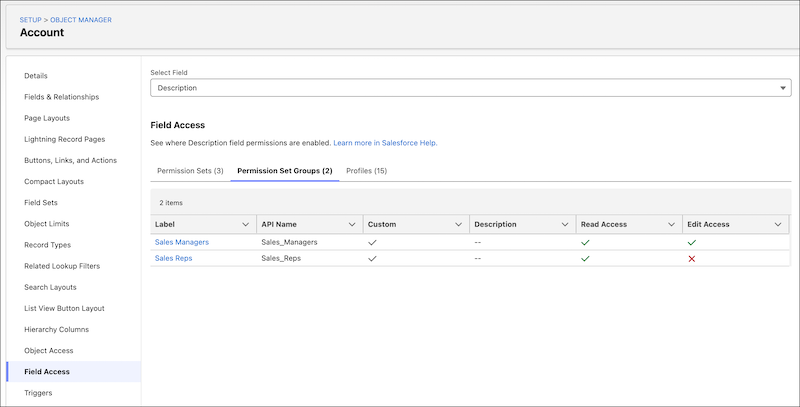
- Easier field access review – Admins can review field-level security for a specific field across profiles, permission sets, and permission set groups in one place using the Field Access Summary in Object Manager.
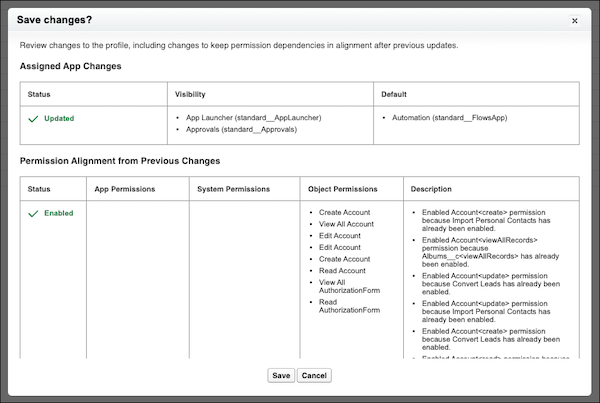
- Clearer permission dependencies – When updating permissions or apps in the enhanced profile interface, admins can now see related permission changes needed to keep dependencies aligned, instead of only finding those changes later in Setup Audit Trail.
Preparing for Summer 2026
The best approach is to start small: review the products your organization actively uses, test the most relevant features in a sandbox, and document any changes that may affect users. Not every release note will matter to every org, but a focused review can uncover meaningful improvements in automation, reporting, self-service, commerce, fundraising, and AI-assisted work.
Current managed services clients should work with their Salesforce partner or admin team to determine which Summer ’26 features are worth enabling, testing, or saving for a future roadmap conversation.
The Fíonta team is always happy to help your organization make the most of Salesforce, or to work with you to implement the new changes into your platform. For more information, click here to schedule time to chat with us.