

What a Day With the Nonprofit Cloud Advisory Board Told Me About Where Salesforce Is Headed

The Most Useful Day of My Dreamforce Wasn’t a Keynote
The best day of my Dreamforce week didn’t happen anywhere near a keynote stage.
The Salesforce for Nonprofits team invited me to a day-long Nonprofit Cloud Partner Advisory Board session; a small group of partners Salesforce has vetted as experienced Nonprofit Cloud implementers. We spent the day talking about where the product is going, what’s being built, how it’s being rolled out, and what is and isn’t working in real deployments.
What made the day worth it was that the conversation went both ways. Salesforce didn’t walk us through a finished roadmap and wait for applause. They asked which parts of it were wrong, and they listened to partners who spend every week inside these implementations. That matters for the organizations we work with, because the feedback in that room came from your deployments.
Here’s what I took away from that session and the rest of the week.
Everyone in the room agreed the product is hard
The clearest takeaway from the day was something I didn’t expect to hear from partners and Salesforce product people alike: Nonprofit Cloud is big, and it’s complicated.
Nobody was defensive about it. The capability is real, and for organizations with the budget and technical staff to shape it, it does remarkable things. But many nonprofits don’t have that bench. An organization with three people in operations and no in-house Salesforce admin is looking at the same platform as a national organization with a dedicated CRM team, and the gap between what the product can do and what that organization can realistically stand up is where implementations stall.
Salesforce’s answer is accelerators. Instead of starting every implementation from a blank platform and configuring toward a vision, Salesforce is moving toward pre-built quick starts for the things most nonprofits need on day one: stakeholder management, fundraising, and volunteer management first, with more on the way. The goal is to get organizations live faster, from a standardized, opinionated starting point instead of an open field.
If you’ve been through a Salesforce implementation, you know why that matters. The expensive part is rarely the technology. It’s the months spent deciding how your organization should work before anyone can configure anything. A good accelerator makes that decision for you on the 80 percent that’s common across nonprofits and saves your budget for the 20 percent that’s specific to your mission.
It’s also how we work at Fíonta. We offer accelerators for the moves we see nonprofits make most often. Our Fundraising accelerator, built on Salesforce’s Fundraising Quick Start, stands up Nonprofit Cloud fundraising with gift entry, campaigns, and donor stewardship already set up. Our Raiser’s Edge to Nonprofit Cloud accelerator starts from a standard map and pre-built migration code. And our NPSP to Nonprofit Cloud accelerator is built for organizations moving off the Nonprofit Success Pack. Each one starts from the decisions that most nonprofits make the same way, so your time and budget go to the parts that are yours.
What I argued for in the room
Salesforce is moving to a faster release cadence across the board, going from three big releases a year to smaller monthly releases, with major ones still mixed in. Fíonta already works in Salesforce clouds that ship on a monthly cycle, so this pace is familiar territory for our team.
Faster releases are mostly good. Fixes arrive sooner, features no longer wait 9 months for a window, and the platform can respond to a fast-moving market. But velocity has a cost, and it lands hardest in one place: the middle of an implementation.
Here’s what that looks like. Say your organization is three months into a Nonprofit Cloud implementation. Your partner is deploying a substantial chunk of configuration into a sandbox, validating it, and promoting it to production on a schedule your staff has planned around. Meanwhile, Salesforce ships a platform change into the same org. Most of the time, nothing happens. But sometimes something does, and now you are debugging an interaction between your deployment and theirs, on a timeline that didn’t have room for it.
So I made a simple proposal: let partners and customers opt out of minor releases and take changes only at major release windows. Not permanently, and not for everyone, but during an active implementation, being able to keep the ground still while you build on it is worth a lot.
The response was receptive from both the Salesforce product team and the other partners around the table, several of whom had run into versions of the same problem. Nobody committed to anything, and I wouldn’t expect them to in that session. But the concern landed, and it came from people who’ve lived through what it costs.
That’s why it’s worth being in the room. You get to tell the people who can fix something, “this specific thing will hurt our clients,” and have them take it seriously.
The expectation that partners use AI to deliver
The other big message in that room was that partners are expected to adopt AI in how we deliver, not just in what we implement.
This wasn’t pitched as a nice-to-have, and the pressure is coming from customers. Organizations evaluating Salesforce partners increasingly assume that AI is already part of how the work gets done, and that it shows up as faster delivery and fewer errors rather than as a line item on a proposal. If a partner’s approach looks the same as it did three years ago, it’s going to start looking like one that hasn’t kept up.
If you’re a client, it’s worth asking your partner directly: where specifically is AI changing how you build, and what does that mean for my timeline and my cost? A partner who can answer concretely is telling you something real. A partner who answers with adjectives is telling you something, too.
Licensing, Agentforce, and opening the platform up
Outside the nonprofit sessions, plenty of the broader Dreamforce news matters for anyone running Salesforce.
Licensing is getting simpler, which is good news (and long overdue) for nonprofits that have spent years trying to work out which SKU they need. The new licenses also give nonprofits more features in the bundle, so you’re not tacking on extra license types. For example, nonprofits will now be able to get Slack and Tableau Next with their core Salesforce license, which opens up collaboration and analytics.
The bigger push is Agentforce adoption and the launch of AIforce, the new interface layer announced in the opening keynote. AIforce flips the usual model. Instead of asking people to come into Salesforce to do their work, it brings Salesforce data, workflows, permissions, and business logic to the tools people already use. It launched with three surfaces: Claudeforce, which puts Salesforce inside Claude through a prebuilt MCP server; Slackforce, which brings CRM context into Slack; and Agentforce Coworker, which lives inside the Lightning interface your staff already use.
The names are easy to mix up, so to be clear: Agentforce is still the digital workforce layer, and AIforce is the interface layer that sits on top of it. One doesn’t replace the other.
Why this is the piece that matters for nonprofits
Of everything I saw that week, this is the one I’d pay the most attention to.
Marc Benioff talked about unlocking the value trapped inside your CRM. For most nonprofits, that trapped value is real, and it’s specific. The data is in there. The people who need it most just don’t go and get it.
Think about who in your organization actually logs into Salesforce. Your operations team, certainly. Your fundraisers, mostly. Now think about your executive director, your program directors, and your board. For that second group, Salesforce is something they receive a monthly report on, assembled by someone else, answering the questions that person anticipated. Everything they didn’t anticipate stays locked up.
There are two levels of value here, and the first one is available almost immediately.
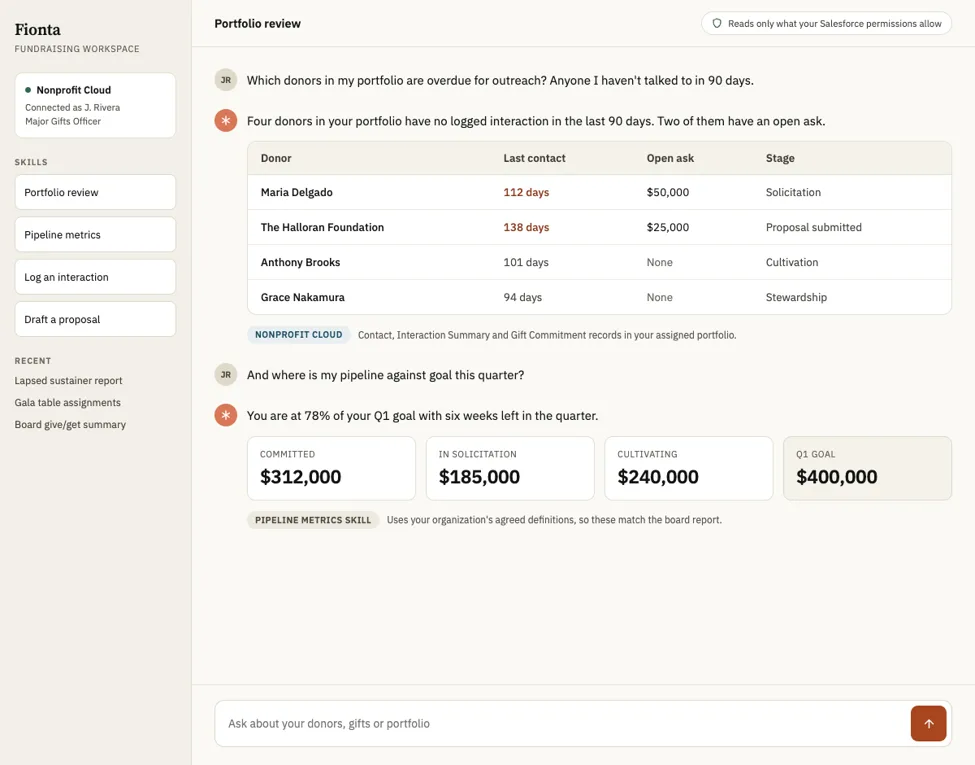
The simpler case is read-only. Picture an AI interface that lets someone who never logs into Salesforce ask a question in plain language and get an answer from live data, using the permissions they already have. No report request, no queue, no waiting for month-end. For a board member preparing for a meeting or an ED walking into a funder conversation, that alone changes the pace of the organization.
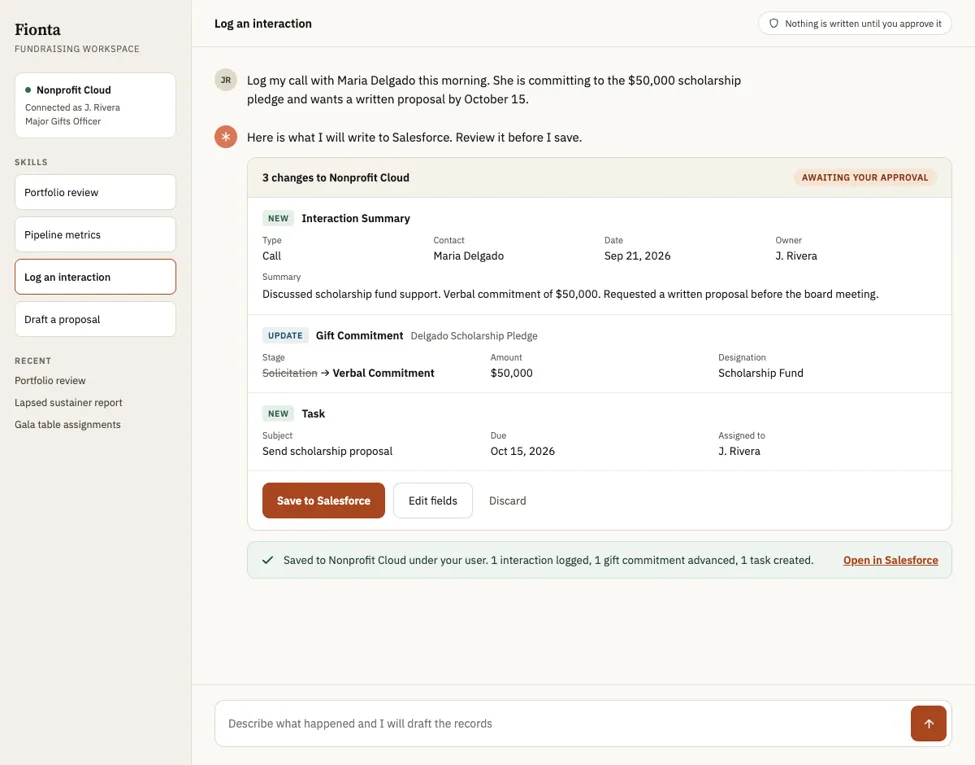
The more interesting case is read and write. An interface that can update records, log an interaction, and move a gift forward, all within the governance you already have in place. That’s where the CRM stops being a place you go to record what already happened and starts being something that participates in the work.
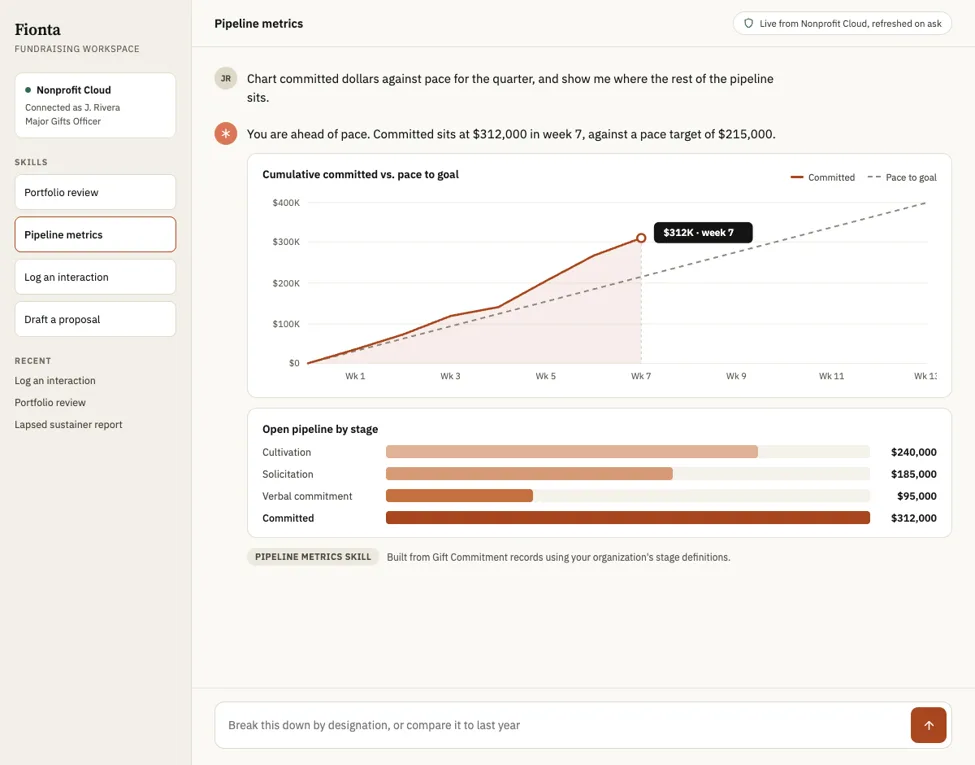
This isn’t hypothetical for Fíonta. We’ve implemented MCP servers for organizations to do exactly this, and we’ve built skills on top of them to standardize how questions get answered. The skills part is easy to overlook, but it matters more than it sounds. If you ask three people at your organization about the state of the fundraising pipeline, you may get three different numbers, because “pipeline” means something slightly different to each of them. A skill encodes the agreed-upon definition: these are the metrics, this is how they’re calculated, this is the language we use to report them. Everyone asking the question gets the same answer because the definition lives in one place rather than in three heads.
You can also use an AI layer to visualize the data outside of Salesforce. This is especially useful for putting KPIs in front of leaders and board members, and it’s usually where visualizations make the biggest impression.
Two things to keep in mind. AIforce launched with 37 prebuilt skills built for sales, not for fundraising or program management, so what this looks like against a nonprofit data model is still being worked out. And exposing your data through a conversational interface inherits whatever your permission model looks like today. If that model is messy, this makes the mess more reachable, not less. Both of those are solvable, but neither is automatic.
Where to start
If this sounds like your organization, the best next step is a demo, not a proposal.
We’d be glad to show you what this looks like against real nonprofit data: what a read-only digest gives your leadership, what standardized metric definitions do for reporting consistency, and what it would take to get there from where you are today. It’s a conversation, not a commitment, and you’ll leave it knowing whether this is worth your time.
Every nonprofit’s Salesforce data and permission model look a little different, so the right first step with AIforce and MCP will vary, too. Fíonta can show you what this looks like against real nonprofit data: a read-only digest for your leadership, shared metric definitions that keep reporting consistent, and a clear path from your current setup to an AI layer your whole team can use. Contact us to book a demo and find out whether it’s a fit for your organization.