


WP2Shell Vulnerability: Protect Your Website Now

In mid-July, security researchers gave a new WordPress bug a nickname that tells you everything you need to know: wp2shell. The wp2shell vulnerability quickly became a concern as two separate logic flaws, chained together, let a stranger with no account and no plugin turn a stock WordPress install into a working shell. This wasn’t a lab demo. Exploitation was already underway before most site owners knew a patch existed.
If you run WordPress and haven’t checked your version number this week, this is the post that changes that.
What Actually Broke
wp2shell is two CVEs wearing a trench coat. Neither one is dramatic on its own. Together, they’re a full pre-authentication remote code execution chain.
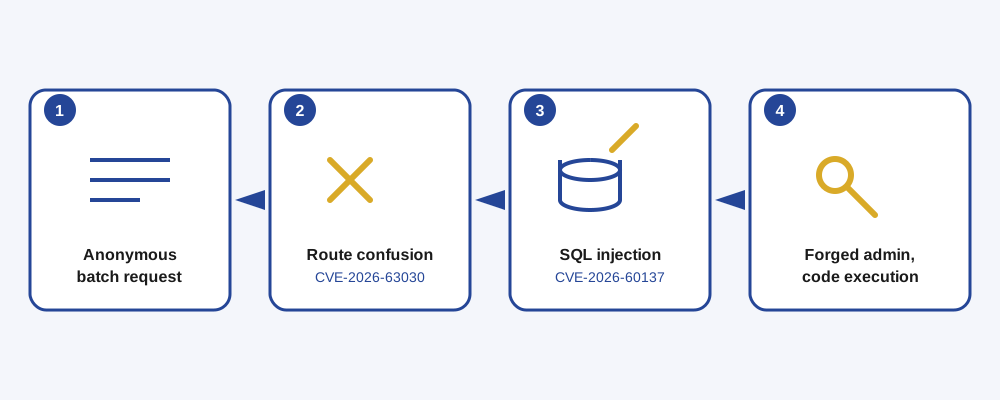
CVE-2026-63030 is a routing bug in the REST API’s batch endpoint (/wp-json/batch/v1). WordPress lets you bundle several API requests into one batch call. Internally, it validates each sub-request in one loop and dispatches them in a second, separate loop. When one sub-request’s URL fails to parse, the error gets recorded in the validation list but never gets a matching entry in the dispatch list. The two lists fall out of sync by one position, and every request after that point gets routed to the wrong handler.
CVE-2026-60137 is a SQL injection in the author__not_in parameter of WP_Query, WordPress’s core query engine. On its own, it’s gated behind a login. Paired with the routing confusion above, that gate disappears.
How the Chain Works, Without the Jargon
Think of the batch endpoint like a hotel front desk handling a stack of room-service orders at once. The desk clerk checks each order for a valid room number in one pass, then sends the orders to the kitchen in a second pass. If one order has a garbled room number, the clerk notes the problem, but the kitchen still gets a ticket, just shifted one spot down the stack. Suddenly order five gets delivered to room four. That’s the routing confusion in a sentence: a request meant for one internal handler gets dispatched to another, one that never expected to receive it and doesn’t check who’s asking.
That misdirection is enough to smuggle the SQL injection past the login check it’s normally hidden behind. From there, an attacker can manipulate query results to forge session data, plant a fake administrator account, log in as that account, and upload a malicious plugin. A plugin is just PHP that WordPress will happily execute. At that point, it’s not your server anymore.
Who’s Affected
| Version range | Fixed in |
|---|---|
| Up to 6.8.5 | 6.8.6 |
| 6.9.0 through 6.9.4 | 6.9.5 |
| 7.0.0 through 7.0.1 | 7.0.2 |
WordPress 6.8 only carries the SQL injection half of the chain, since the routing bug was introduced later. Everything from 6.9.0 onward carries both, which is the full pre-auth path to code execution. All three patches shipped July 17, 2026, and the WordPress security team took the unusual step of forcing background updates onto every site that supports them. Unusual, because WordPress almost never does that. That alone tells you how the core team rated this one.
What to Do Right Now
Skip the debate about whether this applies to you. If you’re running an affected version, it applies to you.
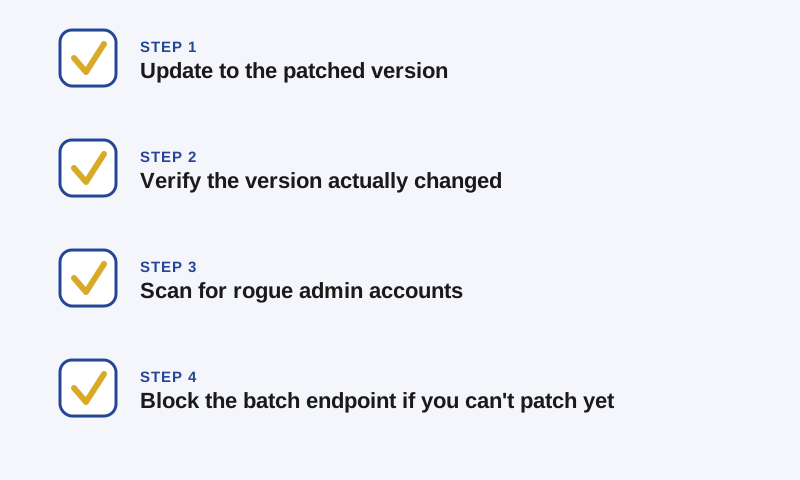
- Update immediately. Go to 7.0.2 if you’re on the 7.x line, 6.9.5 if you’re on 6.9.x, or 6.8.6 if you’ve deliberately held back on 6.8. Don’t wait for the forced auto-update to get to you. Confirm the version number yourself in wp-admin, since background updates can fail silently, especially on shared hosting or on sites with update notifications disabled.
- Verify the update actually landed. Check the version footer in your dashboard, not just your inbox for a confirmation email. If your host manages updates for you, ask them to confirm rather than assuming.
- Scan for signs you were already hit. Look through your Users screen for administrator accounts you don’t recognize, especially ones with logins or usernames like
wp2_,wpsvc_, orw2s_followed by a string of hex characters, or email addresses on unfamiliar domains. Check your Plugins screen for anything you didn’t install. Check server logs for requests to/wp-json/batch/v1around and before July 17. - If you can’t patch immediately, buy yourself time. Block requests to
/wp-json/batch/v1(and the equivalent?rest_route=/batch/v1query-string form) at your firewall or CDN, or disable anonymous REST API access with a security plugin. This is a stopgap, not a fix. Patch as soon as you can.
If You’ve Already Been Hit
No suspicious accounts or files doesn’t mean you’re clean. It means nothing turned up in an automated pass, which is a good sign, not a guarantee. If you do find a rogue admin account or an unfamiliar plugin, don’t just delete it and call it done. Rotate your WordPress security keys and salts, force a password reset for every real admin account, and go through your plugin and theme files for anything that shouldn’t be there. If the site handles anything sensitive, that’s the point where it’s worth having someone who does incident response for a living take a proper look before you’re confident calling it resolved.
We’ve spent years keeping client WordPress sites patched, monitored, and recoverable when something does slip through. If wp2shell has you wondering whether your own maintenance process would have caught this in time, that’s a conversation worth having before the next one comes along.
Fíonta is here to help. Reach out to our team with our contact form for more information.
References consulted:
- WordPress 7.0.2 Release – WordPress News
- WordPress 7.0.2 Security Release now available – Pantheon Docs
- CISA Adds Four Known Exploited Vulnerabilities to Catalog
- CVE-2026-63030 and CVE-2026-60137 (wp2shell): WordPress RCE Explained – Picus Security
- wp2shell: incident response guide – Eye Security Labs
- WordPress Core “wp2shell” RCE flaws get public exploits, patch now – BleepingComputer